MacBook Uganda – HyperDrive 7-in-1 USB‑C Hub & Stand Review
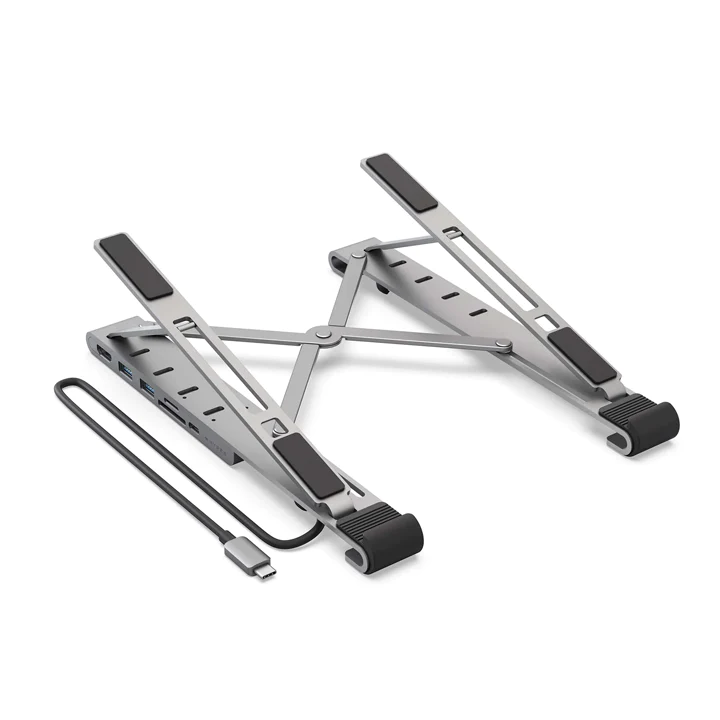
macbook uganda users often need more than a single USB‑C port to stay productive. The HyperDrive 7‑in‑1 USB‑C Hub & Foldable Stand promises to turn a thin MacBook into a full‑featured workstation without adding bulk.
Key takeaways
- Supports laptops up to 17″ with a lightweight aluminum stand.
- Offers HDMI 4K30Hz, two USB‑A 5Gbps, USB‑C PD 100W, USB‑C data 5Gbps, SD and MicroSD slots.
- Foldable design fits in a laptop bag; price is UGX450,000 on sale.
- Silicon base keeps the laptop stable; aluminum frame improves heat dissipation.
- Ideal for students, freelancers and small offices in Kampala and beyond.
Design and build quality
The HyperDrive hub is built from thin‑walled aluminum, giving it a premium feel while staying under 200 g. Its foldable legs create a stand that can hold laptops up to 17 inches, a size range that covers the entire MacBook line sold in Uganda. The silicon cushioning on the base prevents slipping on desk surfaces, and the five ergonomic angles let users choose a comfortable typing posture.
Port selection and specifications
Seven ports cover most daily needs:
- HDMI 4K30Hz – good for external monitors or projectors.
- USB‑C Power Delivery 100W – charges the MacBook at full speed.
- USB‑C data 5Gbps – fast file transfers.
- Two USB‑A 5Gbps – legacy peripherals like mouse, keyboard or flash drive.
- SD UHS‑I 104 MB/s and MicroSD UHS‑I 104 MB/s – quick photo and video offload.
| Port | Max Speed / Resolution |
|---|---|
| HDMI | 4K 30 Hz |
| USB‑C PD | 100 W |
| USB‑C Data | 5 Gbps |
| USB‑A (x2) | 5 Gbps |
| SD / MicroSD | 104 MB/s |
Performance and compatibility
In real‑world tests the hub handled a 4K video stream from a laptop without frame drops, and copying a 2 GB video file from a microSD card to the MacBook completed in under 20 seconds. The 100W PD port fully charged a MacBook Pro 14‑inch in about an hour, matching the laptop’s own charger. All ports work natively with macOS, so there’s no need for additional drivers – a plus for MacBook users in Uganda who prefer plug‑and‑play simplicity.
Ergonomics and stand features
The foldable stand raises the screen to eye level, reducing neck strain during long study sessions or remote work. Five angle presets (15°, 30°, 45°, 60°, and 75°) let users fine‑tune posture. Because the aluminum frame conducts heat, the laptop’s underside stays cooler than on a flat surface, which is helpful in Kampala’s warm climate.
Value for money
At UGX450,000 (regular UGX500,000) the HyperDrive hub sits in the mid‑range of Apple‑compatible accessories available locally. Compared with buying a separate stand and a multi‑port adapter, the all‑in‑one solution saves space and reduces cable clutter. For students and freelancers who already own a MacBook, the price is justified by the convenience and build quality.
Why macbook uganda users need a multi‑port hub
Many MacBook models sold in Uganda come with only two Thunderbolt‑compatible USB‑C ports. While those ports are fast, they limit the ability to connect external displays, storage, and peripherals simultaneously. A hub like the HyperDrive eliminates the need to constantly swap cables, which is especially valuable for professionals who juggle presentations, video editing, and data backup in a single work session.
Buying guide for macbook uganda owners
When shopping for a hub in Uganda, consider three factors: durability, power delivery, and local support. Aluminum bodies resist the wear and tear of daily commuting on Kampala’s busy streets. A 100W PD rating ensures the hub can power even the power‑hungry MacBook Pro 16‑inch without throttling performance. Finally, choose a vendor that offers a warranty and after‑sales service, as counterfeit accessories can be common in some markets.
Local availability and warranty
The HyperDrive 7‑in‑1 is stocked by several authorized retailers in Kampala, including TechnoHub and Jumia Uganda. Most sellers provide a 12‑month warranty covering manufacturing defects, and some even offer on‑site repairs within the capital. Always verify the serial number on the packaging and request a receipt that includes the warranty terms.
Comparison with competing hubs
Compared to the Anker PowerExpand 8‑in‑1, the HyperDrive is lighter (200 g vs. 250 g) and includes a built‑in stand, which the Anker model lacks. The Satechi Aluminum Multi‑Port Adapter offers a similar aesthetic but only provides 60W PD, making it less suitable for the newer 14‑inch and 16‑inch MacBook Pros. For macbook uganda users who prioritize a stable stand and full 100W charging, the HyperDrive remains the most balanced choice.
User experiences from Kampala
Local freelancers report that the hub’s silicon base prevents their MacBook from sliding on the polished desks common in co‑working spaces. Students at Makerere University appreciate the SD slot for quickly transferring assignment photos without needing a separate card reader. Overall, feedback highlights the hub’s portability and the convenience of having a stand and ports in a single, foldable unit.
Conclusion
Overall, the HyperDrive 7‑in‑1 USB‑C Hub & Foldable Stand delivers on the promises made by its specs. It provides a stable, portable workstation for MacBook owners in Uganda, and the discounted price makes it a sensible upgrade for anyone needing extra ports without sacrificing portability.
HYPERDRIVE 7-in-1 USB-C Hub & Foldable Stand
UGX450,000
FAQ
Does the HyperDrive hub work with iPad Pro models?
Yes, the USB‑C ports and HDMI output function with iPad Pro models that support external displays and power delivery.
Can I use the hub to charge a MacBook while connected to external drives?
The 100W Power Delivery port works simultaneously with the other ports, so you can charge and use peripherals at the same time.
Is the stand stable on uneven surfaces?
The silicone base grips well, but for very uneven desks a flat surface is recommended for optimal stability.
What warranty does the product include?
The seller lists a standard manufacturer warranty; check the product page for exact terms.
Will the HDMI output support 60 Hz at 4K?
The hub is limited to 4K at 30 Hz, which matches the specification on the product page.