iPhone 14 Pro Max 1TB Gold: How to Use It Effectively
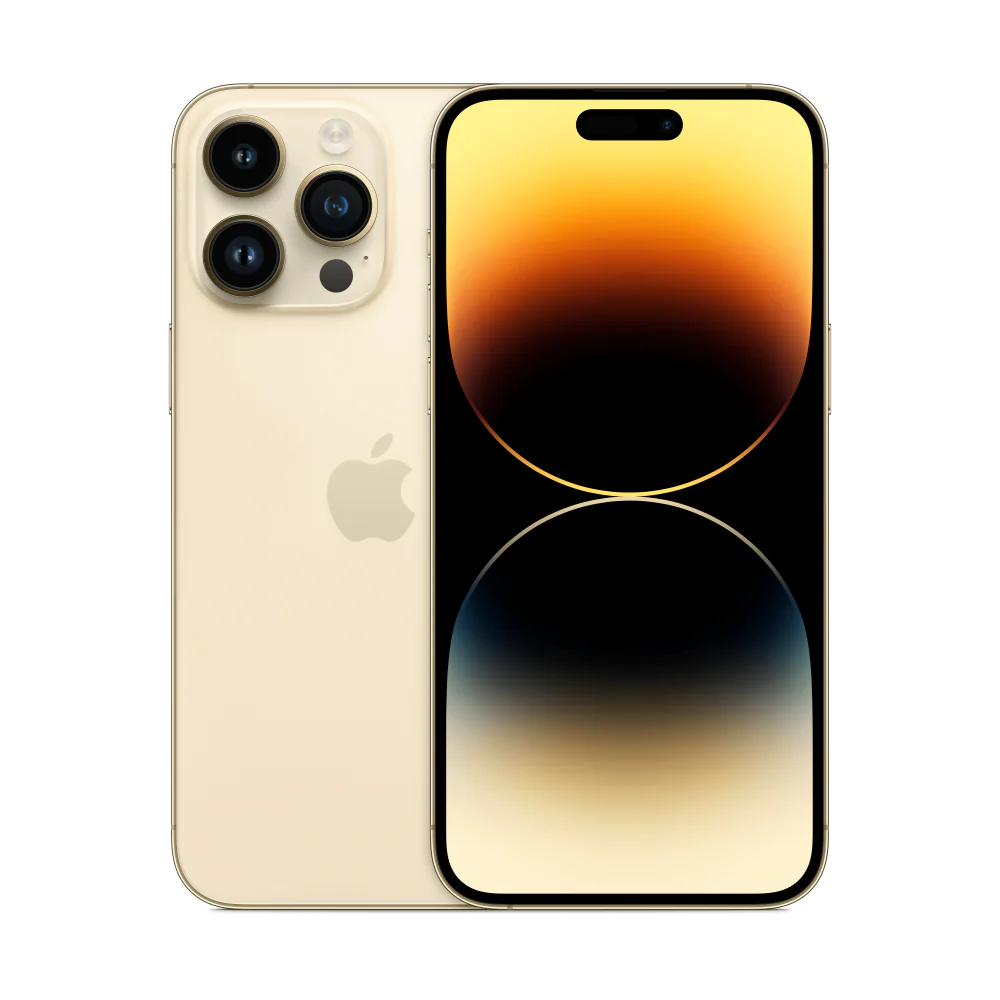
If you have just bought the iPhone 14 Pro Max 1TB Gold, you might wonder how to use it effectively. This guide walks you through the essential steps for the gold‑finished flagship, with a focus on features that matter most to Ugandan users.
Key takeaways
- Set up iOS 16 in under five minutes.
- Dynamic Island and Always‑On display are ready to boost productivity.
- 48MP camera delivers professional‑grade photos with simple gestures.
- Crash Detection adds a layer of safety on busy Kampala roads.
- Local carriers support superfast 5G for seamless streaming.
Unpacking the iPhone 14 Pro Max 1TB Gold
The box contains the phone, a USB‑C to Lightning cable, documentation and a SIM‑eject tool. Remove the protective film and power the device by holding the side button. The gold finish is a brushed aluminium that resists fingerprints, but a microfiber cloth keeps it looking pristine.
Setting up iOS 16 and your Apple ID
When the welcome screen appears, follow the on‑screen prompts to select language, region (choose Uganda), and connect to Wi‑Fi. Sign in with your Apple ID or create one; this links the device to iCloud, Apple Music and Find My iPhone. Enable Face ID during setup – it works quickly even in bright sunlight.
Using Dynamic Island and the Always‑On display
Dynamic Island replaces the notch with an interactive area that expands for alerts, timers or live activities. Swipe down from the top to customise which apps appear. The Always‑On display shows the clock, widgets and notifications without waking the screen, saving battery while keeping essential info visible.
Getting the most from the 48MP camera
The iPhone 14 Pro Max 1TB Gold’s 48MP main sensor captures up to four times the resolution of earlier models. In the Camera app, tap the 48‑MP icon for high‑detail shots, or stay in the default 12‑MP mode for faster processing. Use Photonic Engine for better low‑light performance, and try the new 4K Dolby Vision video at 30 fps for cinematic results. Action mode stabilises handheld footage – ideal for recording Kampala traffic or family gatherings.
Battery, safety features and connectivity
Apple advertises up to 29 hours of video playback on a single charge. To extend life, enable Optimised Battery Charging and use Low Power Mode when the battery drops below 20 %. Crash Detection automatically contacts emergency services if a severe impact is detected; you can test it in Settings → Safety. The A16 Bionic chip ensures smooth 5G performance on local networks such as MTN and Airtel.
Tips for local Ugandan users
Buy a carrier‑approved SIM with a data plan that includes 5G; most major providers now support the iPhone’s bands. Install the Ugandan keyboard in Settings → General → Keyboard to type in Luganda or other local languages. For power‑hungry tasks like streaming Ugandan football, use the built‑in Screen Time to monitor usage. Finally, back up daily to iCloud or a local computer to protect your 1TB of photos and videos.
With these steps, your iPhone 14 Pro Max 1TB Gold will feel like a natural extension of your daily routine, whether you’re navigating Kampala streets, capturing sunrise over the Nile, or staying connected with friends and family.
Understanding the A16 Bionic Chip
The A16 Bionic processor powers the iPhone 14 Pro Max 1TB Gold, delivering fast performance for gaming, multitasking, and AI‑driven features. In Uganda, this means smoother streaming of local sports events and quicker app launches even on 5G networks.
Optimising Storage Management
With 1TB of internal storage you can keep thousands of photos, videos, and apps. Use Settings → General → iPhone Storage to see a breakdown and enable “Offload Unused Apps” to free space automatically. Regularly transfer large video files to a computer or external SSD to keep the device responsive.
Using Apple Services in Uganda
Apple Music, Apple TV+, and iCloud work seamlessly as long as you have a stable data plan. To avoid unexpected charges, set a data limit in Settings → Cellular. You can also download playlists for offline listening during trips to remote areas where coverage is limited.
Maintenance and Care
Keep the gold finish looking new by cleaning with a soft, lint‑free cloth. Avoid abrasive cleaners. Apply a screen protector to guard against scratches, especially if you use the phone for outdoor photography. Consider a waterproof case if you travel near Lake Victoria.
Troubleshooting Common Issues
If the device becomes unresponsive, try a force‑restart: press and quickly release the volume up button, then volume down, then hold the side button until the Apple logo appears. For connectivity problems, reset network settings via Settings → General → Reset → Reset Network Settings.
Exploring Local Apps and Services
Ugandan users benefit from apps like MTN Mobile Money, Airtel Money, and the government’s e‑services portal. To install, open the App Store, search for the app name, and tap Get. Enable notifications so you receive transaction alerts instantly. The iPhone’s NFC capability also works with contactless payment cards, allowing you to tap‑and‑pay at merchants that support Visa or Mastercard.
For navigation, Google Maps and Waze provide up‑to‑date traffic information in Kampala. You can also download offline maps for areas with limited connectivity. Pair the iPhone 14 Pro Max 1TB Gold with a Bluetooth headset for hands‑free calls, which is especially useful when driving on busy roads.
By following these tips, you’ll get the most out of your iPhone 14 Pro Max 1TB Gold, enjoying its premium features while staying connected to the vibrant life of Uganda.
iPhone 14 Pro Max 1TB Gold
UGX4,000,000
FAQ
How do I transfer data from my old phone to the iPhone 14 Pro Max 1TB Gold?
Use the Quick Start feature: place both phones near each other, follow the on‑screen prompts, and choose what to transfer – apps, photos, contacts and settings.
Can I use the iPhone 14 Pro Max with a Ugandan carrier’s 5G network?
Yes. Major carriers such as MTN, Airtel and Africell support the required 5G bands for the A16 Bionic chip.
What is the best way to keep the gold finish from scratching?
Apply a clear matte screen protector and use a soft microfiber cloth for cleaning. Avoid abrasive surfaces and store the phone in a protective case.
How does Crash Detection work on the iPhone 14 Pro Max?
The phone’s sensors detect a severe impact and automatically call emergency services after a brief countdown, unless you cancel the call.
Is the 1TB storage enough for 4K Dolby Vision video?
Yes – a 1TB model can hold dozens of hours of 4K Dolby Vision footage, especially when combined with iCloud storage for backup.
Sources
- PhoneArena: Apple iPhone 18 Pro Max: release date, price, specs, and must-know features
- Tbreak UAE: Goldgenie’s 24K gold iPhone 18 Pro starts at £2,997
- WhatMobile: Compare Apple iPhone 14 Pro Max vs Honor Play 20C
- MobileDokan: Apple iPhone 14 Pro Price in Bangladesh 2026, Specs & Review
- MobileDokan: Apple iPhone 17 Pro Max (1TB HK/AUS) Price in Bangladesh 2026, Specs & Review

