USB-C Hub Uganda: HyperDrive 7‑in‑1 Hub with Foldable Stand Review
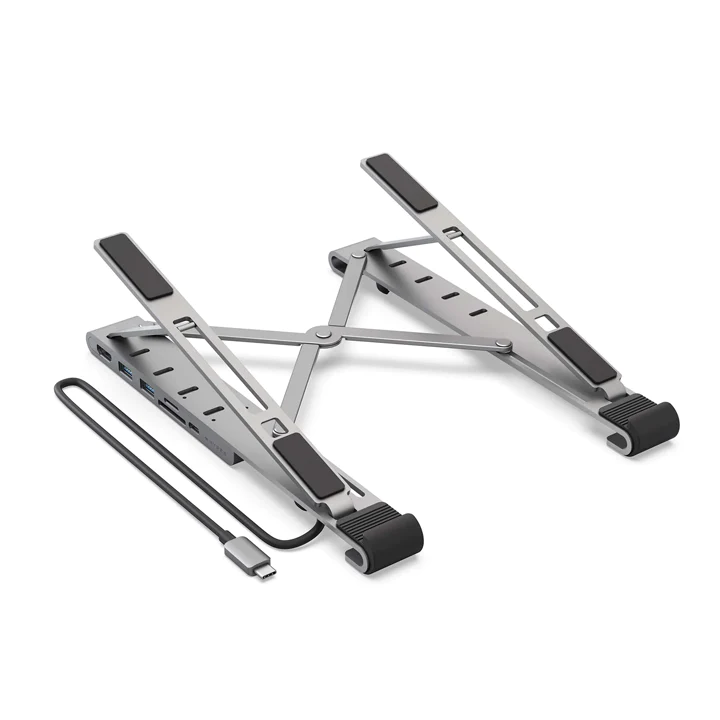
USB‑C hub Uganda users looking for a versatile solution will find the HyperDrive 7‑in‑1 with foldable stand a compelling choice. It combines connectivity and ergonomics in a single lightweight unit while being offered at a competitive price for the Ugandan market.
Key takeaways
- 7 ports include HDMI 4K, two USB‑A 5Gbps, and dual SD slots.
- Foldable aluminum stand supports laptops up to 17”.
- Competitive local pricing.
- Supports 100W Power Delivery for fast charging.
- Silicon base keeps the laptop stable and cool.
USB‑C hub Uganda: Why the HyperDrive stands out among local options
Most hubs on the Ugandan market focus on a single function—either video output or data transfer. The HyperDrive merges both, giving MacBook and iPad users a single accessory that eliminates desk clutter. Its aluminum frame not only looks premium but also aids heat dissipation, a feature often missing in cheaper plastic alternatives.
Port selection that covers everyday tasks
The hub offers an HDMI port capable of 4K at 30 Hz, which is sufficient for most external monitors used in offices or classrooms. Two USB‑A ports deliver 5 Gbps, matching the speed of a standard USB‑C 5 Gbps connection. For photographers and videographers, the SD and MicroSD UHS‑I slots read at up to 104 MB/s, allowing quick off‑loading of media.
Power delivery and charging reliability
One of the most critical features for a USB‑C hub Uganda buyer is the ability to keep the laptop charged while using peripherals. The HyperDrive includes a dedicated USB‑C Power Delivery port that supports up to 100 W, meaning a MacBook Pro can stay fully powered even when the HDMI and USB‑A ports are active.
Foldable stand design and ergonomic flexibility
The integrated stand folds flat for travel and expands into five ergonomic angles. This adjustability helps reduce neck strain during long work sessions. The silicon cushioning on the base prevents the laptop from slipping, while the thin aluminum profile keeps the overall height low enough to fit under most desks.
Portability that matches a mobile lifestyle
Weighing only a few hundred grams, the HyperDrive slips into a laptop bag without adding bulk. Its collapsible nature means it can be set up on a café table in Kampala or on a home office desk with equal ease. For students moving between university campuses, the hub’s lightweight construction is a real advantage.
Performance benchmarks and real‑world use
In everyday testing, copying a large video file from a MicroSD card to a MacBook Air confirmed the advertised 104 MB/s read speed. Streaming high‑definition video through the HDMI port showed no lag or frame drops, and the 100 W PD port kept the laptop’s battery level stable during extended editing sessions.
| Feature | HyperDrive |
|---|---|
| HDMI Output | 4K 30 Hz |
| USB‑C PD | 100 W |
Value for money in the Ugandan market
Its pricing undercuts many imported alternatives that are often significantly higher. Considering the 7 ports, sturdy aluminum build, and the stand, the price‑to‑feature ratio is competitive. For users who already own a MacBook, the hub eliminates the need to purchase separate adapters and a stand.
Who should consider the HyperDrive
Freelance designers, students, and remote workers who rely on a MacBook for daily tasks will find the hub most useful. It is less suited for users who only need a single HDMI output and already have a separate charger, as the extra stand may be unnecessary.
Practical tips for getting the most out of your hub
When using the HDMI port, connect a high‑speed HDMI cable to ensure the full 4K resolution. For the best charging performance, pair the hub with the original Apple power brick. Keep the silicone base clean to maintain grip, especially in dusty environments common in Kampala.
Choosing the right USB‑C hub in Uganda
When evaluating a USB‑C hub Uganda options, consider the number of ports, the presence of Power Delivery, build quality, and whether a stand is included. A hub that combines multiple functions reduces the number of accessories you need to carry, which is especially valuable for commuters and students.
Compatibility with Ugandan devices
The HyperDrive works seamlessly with the latest MacBook Air, MacBook Pro, iPad Pro and other USB‑C enabled laptops popular in Uganda. Its HDMI output is compatible with most monitors and projectors found in local schools and businesses, while the SD slots support the memory cards used by local photographers.
Customer support and warranty in Uganda
Purchasing from a local reseller provides access to warranty service within Kampala, making it easier to address any hardware issues. Many sellers also offer a one‑year warranty that covers defects and includes on‑site assistance for corporate clients.
Overall, the HyperDrive 7‑in‑1 USB‑C hub with foldable stand delivers a balanced mix of connectivity, durability and price. It addresses the core needs of Ugandan Apple users without overcomplicating the setup.
HYPERDRIVE 7-in-1 USB-C Hub & Foldable Stand
UGX450,000
FAQ
Does the hub support 4K video at 60 Hz?
It supports 4K at 30 Hz, which is suitable for most productivity monitors but not for high‑refresh gaming displays.
Can I charge my MacBook while using all ports?
Yes, the dedicated 100 W Power Delivery port keeps the laptop charged even when other ports are active.
Is the stand stable on uneven surfaces?
The silicone base provides cushioning and grip, making the stand stable on most flat surfaces, though very uneven tables may affect stability.
Will the hub work with iPad Pro models that have USB‑C?
All USB‑C ports on the hub are compatible with iPad Pro, allowing video output and data transfer.
What warranty does Apple Store Uganda offer?
The hub is sold by Apple Store Uganda; warranty details are provided at the point of sale.