iPhone Price in Uganda: How to Use the iPhone 14 256GB Midnight

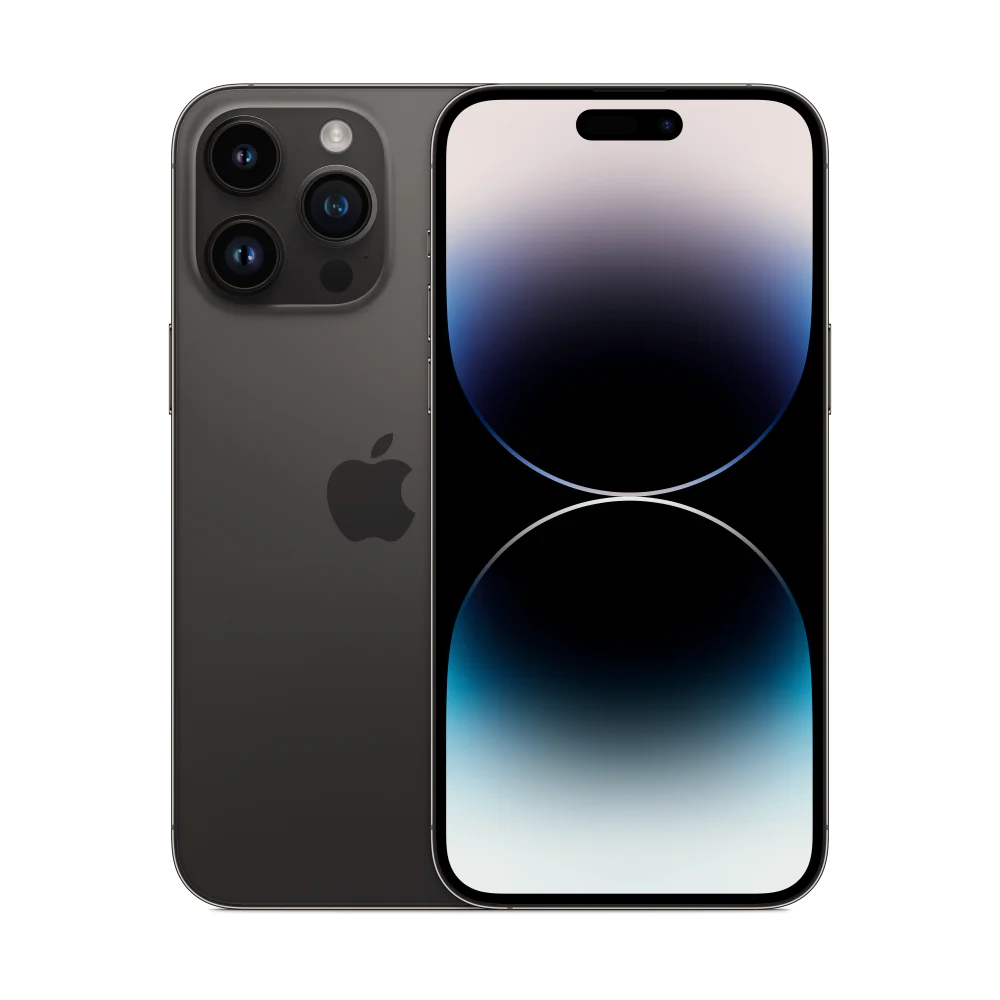
The iPhone price in Uganda has been a hot topic for anyone looking to upgrade to Apple’s latest hardware. The iPhone 14 256GB Midnight, priced at UGX 3,800,000, offers a blend of performance and safety that many Ugandan users appreciate.
Key takeaways
- iPhone 14 256GB Midnight costs UGX 3.8 million in Uganda.
- 6.1‑inch Super Retina XDR display delivers vivid colours.
- Crash Detection can call emergency services automatically.
- iOS 16 brings new personalization options.
- All‑day battery supports up to 20 hours of video playback.
Understanding the iPhone price in Uganda and what you get
At UGX 3,800,000, the iPhone 14 256GB Midnight sits in the premium segment of the Ugandan market. The price includes a full‑size 6.1‑inch Super Retina XDR display, the A15 Bionic chip with a 5‑core GPU, and a dual‑camera system that excels in low‑light conditions.
Unboxing and initial setup
When you first open the box, you’ll find the phone, a USB‑C to Lightning cable, documentation, and a pair of EarPods. Power the device by holding the side button until the Apple logo appears. Follow the on‑screen prompts to select language, connect to a Wi‑Fi network, and sign in with your Apple ID.
Activating 5G and cellular plans
Uganda’s major carriers now support 5G in select areas. Insert your SIM card, go to Settings → Cellular, and enable 5G. Remember that a data‑plan is required for full 5G speeds, and performance varies by location and carrier.
Getting familiar with iOS 16
iOS 16 brings new ways to customize the lock screen, focus modes, and improved notification handling. Explore Settings → Wallpaper to set a personalized lock screen, and use Focus to filter alerts during work or study.
Camera basics and advanced modes
The iPhone 14’s 12‑MP main camera, paired with a 12‑MP ultra‑wide lens, captures sharp images in bright and dim environments. For video, switch to Cinematic mode to record 4K Dolby Vision at up to 30 fps. Action mode stabilises handheld footage, making it ideal for documenting Kampala streets or sports events.
Using Crash Detection for safety
Crash Detection automatically contacts emergency services if a severe car accident is detected. To test the feature, go to Settings → Emergency SOS and enable the toggle. The phone will prompt you to confirm before dialing, ensuring accidental calls are avoided.
Battery management tips
The iPhone 14 offers all‑day battery life with up to 20 hours of video playback. To maximise endurance, enable Low Power Mode in Settings → Battery, dim the display, and turn off background app refresh for rarely used apps.
Storage optimisation for 256 GB
With 256 GB of internal storage, most users will have ample space for apps, photos, and videos. Use Settings → iCloud to offload rarely accessed media, keeping the device fast while retaining a backup in the cloud.
Connecting accessories
The Lightning port works with Apple’s MagSafe accessories, such as wireless chargers and cases. For a wired connection, use the included USB‑C to Lightning cable with a compatible charger to reach the fastest charging speeds.
Security features you should enable
Face ID provides secure unlocking and Apple Pay authentication. Go to Settings → Face ID & Passcode to set up facial recognition. Additionally, enable Find My iPhone to locate the device if it’s lost or stolen.
Comparing key specifications
| Feature | iPhone 14 256GB Midnight |
|---|---|
| Display | 6.1‑inch Super Retina XDR |
| Chip | A15 Bionic with 5‑core GPU |
| Camera | 12 MP dual‑camera, Cinematic 4K Dolby Vision |
| Battery | Up to 20 hours video playback |
| Price (UGX) | 3,800,000 |
Where to buy the iPhone 14 in Uganda
The device is in stock at Apple Store Uganda & iPhone Shop Kampala. Visit the online store at https://applestoreuganda.com/product/iphone-14-256gb-midnight/ to place an order or walk into the Kampala showroom for a hands‑on demo.
Tips for a smooth transition from Android
If you are switching from Android, use the “Move to iOS” app to transfer contacts, messages, and photos. Familiarise yourself with the App Store for native apps, and explore Apple’s ecosystem for seamless integration with MacBook or iPad devices.
Keeping your iPhone protected
The iPhone 14 features a Ceramic Shield front cover and an IP68 rating, meaning it can survive water up to 6 meters for 30 minutes. Still, consider a clear case and a screen protector to guard against everyday drops on Kampala’s busy streets.
With these steps, you’ll get the most out of the iPhone 14 256GB Midnight while staying aware of the iPhone price in Uganda. Enjoy the blend of performance, camera quality, and safety features that Apple has packed into this sleek Midnight finish.
iPhone 14 256GB Midnight
UGX3,800,000
FAQ
What is the current iPhone price in Uganda for the iPhone 14 256GB?
The iPhone 14 256GB Midnight is priced at UGX 3,800,000 at Apple Store Uganda & iPhone Shop Kampala.
How do I set up Crash Detection on my iPhone 14?
Open Settings → Emergency SOS and toggle on Crash Detection. The phone will automatically call emergency services after a severe impact if you do not respond.
Can I use 5G with my Ugandan carrier?
Yes, if your carrier offers 5G in your area. Insert the SIM, enable 5G under Settings → Cellular, and ensure you have a compatible data plan.
What accessories are recommended for the iPhone 14 Midnight?
A MagSafe charger, a clear protective case, and a screen protector help keep the device safe while taking advantage of fast wireless charging.
How can I transfer data from an Android phone to the iPhone 14?
Download the “Move to iOS” app on your Android device and follow the on‑screen instructions to copy contacts, messages, photos, and apps.