Apple AirTag Uganda: Track Your Belongings with Ease
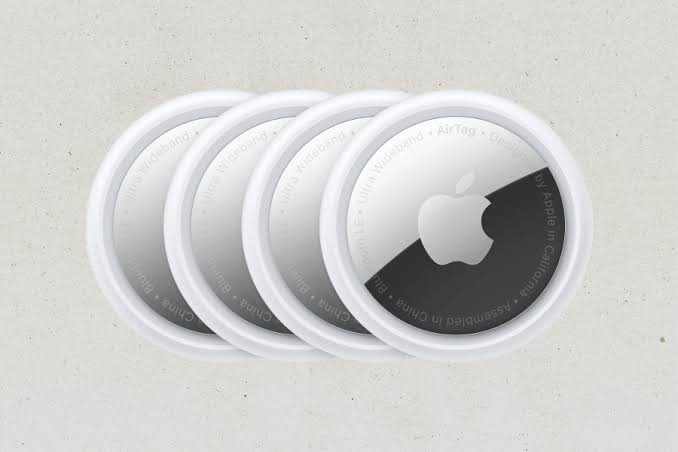
Apple AirTag Uganda is designed to stop the panic of misplaced keys or a lost bag. With a simple attachment and the Find My app, you can see the location of your items on an iPhone or iPad.
Key takeaways
- Works with Apple’s extensive Find My network.
- Compact, lightweight, and water‑resistant.
- Precision Finding on compatible iPhone models.
- Replaceable CR2032 battery lasts about a year.
- Priced at UGX 400,000 and in stock at Gadget Center Uganda.
What is Apple AirTag Uganda?
The Apple AirTag is a small, disc‑shaped tracker that pairs instantly with any iPhone, iPad or Mac running iOS 14 or later. Once linked, the AirTag becomes part of the Find My network, which leverages millions of Apple devices to anonymously relay its location. In Uganda, the device is sold for UGX 400,000 at Gadget Center Uganda, making it an affordable addition for anyone already using Apple products.
How the Find My network works in Uganda
When an AirTag is out of Bluetooth range, nearby iPhones and iPads pick up its encrypted signal and send the location to iCloud. You then see the last known spot in the Find My app. This crowdsourced approach works across Kampala, Entebbe and other urban areas where Apple devices are common. The network is private – Apple does not store the identity of the relaying device.
Key features you’ll use every day
- Precision Finding: On compatible iPhone models, the screen shows distance, direction and even an AR arrow.
- Built‑in speaker: Tap “Play Sound” and the AirTag emits a chirp, useful when the item is nearby.
- Water and dust resistance: It survives a splash or a brief submersion.
- Replaceable battery: A CR2032 coin cell lasts about a year and is easy to swap.
What you can track with Apple AirTag Uganda
Typical use cases include:
- Keys – attach to a keyring and never waste time digging through a bag.
- Wallets – slip the AirTag into a pocket or a small pouch.
- Backpacks and handbags – perfect for students and commuters.
- Luggage – place one in each suitcase for peace of mind on domestic or international trips.
- Other personal items – anything you want to locate quickly.
How to set up Apple AirTag Uganda
Setup takes under a minute. Bring the AirTag close to your iPhone, and a pop‑up appears asking you to name the item. After naming, the AirTag automatically joins your Apple ID. No app download or manual pairing is required. The process works the same whether you’re in Kampala’s central business district or a rural town.
| Feature | Apple AirTag | Typical competitor (Tile Mate) |
|---|---|---|
| Network | Find My (millions of Apple devices) | Tile community (smaller) |
| Precision Finding | Compatible iPhone models | No AR guidance |
| Battery life | ~1 year (CR2032) | ~1 year (CR2032) |
| Water resistance | Water‑resistant | None |
Is Apple AirTag Uganda right for you?
If you already own an iPhone, iPad or Mac, the AirTag integrates seamlessly and adds little extra cost beyond the UGX 400,000 price tag. It is less suitable for Android‑only users, who cannot access the Find My network without an iOS device. For anyone who frequently misplaces keys, bags or travel gear, the convenience outweighs the modest price.
Where to buy Apple AirTag Uganda
Gadget Center Uganda stocks the AirTag and ships across the country. The product page lists the UGX 400,000 price and confirms availability. Buying from a local Apple‑focused retailer also ensures you receive genuine accessories and support.
Next steps after purchase
Once you have your Apple AirTag Uganda, attach it to the item you want to protect, open the Find My app and follow the on‑screen prompts. Test the sound function in your home before you rely on it outdoors. If the battery runs low, replace the CR2032 coin cell – a quick task that restores full functionality.
Privacy and security considerations
Apple designed the AirTag with privacy in mind. The encrypted signal that hops between nearby Apple devices never reveals the identity of the owner or the location of the relaying device. Users receive a notification if an unknown AirTag is traveling with them for an extended period, helping to prevent unwanted tracking.
Tips for getting the most out of your AirTag in Uganda
- Place the AirTag in a location that is not easily visible but still allows the Bluetooth signal to reach nearby devices.
- Enable notifications in the Find My app so you are alerted the moment an item is left behind.
- Regularly check the battery status in the app; a low‑battery alert gives you time to replace the CR2032 before it dies.
- Consider using a keyring holder or a luggage strap that is designed for AirTag attachment to keep it secure during travel.
Future updates and ecosystem growth
Apple continues to expand the Find My network, adding more devices and improving location accuracy. As more Ugandan users adopt Apple products, the network becomes even more reliable, meaning your AirTag will benefit from a growing community of anonymous relays.
Apple AirTag | Gadget Center Uganda
UGX400,000
FAQ
How long does the Apple AirTag battery last?
A CR2032 battery typically lasts about a year before it needs replacement.
Can I use Apple AirTag with an Android phone?
The Find My network is only available on Apple devices; Android users can only hear the sound if they are near the AirTag.
Is the AirTag water‑resistant?
Yes, it has an IP67 rating, meaning it can survive immersion up to 1 meter for 30 minutes.
Do I need an internet connection to locate my AirTag?
The AirTag itself uses Bluetooth; the Find My app needs internet to show the location reported by nearby Apple devices.
Can I attach multiple AirTags to one item?
You can attach more than one, but each will appear as a separate entry in the Find My app.