Apple Watch Ultra 49mm Titanium Green: How to Use It for Adventure
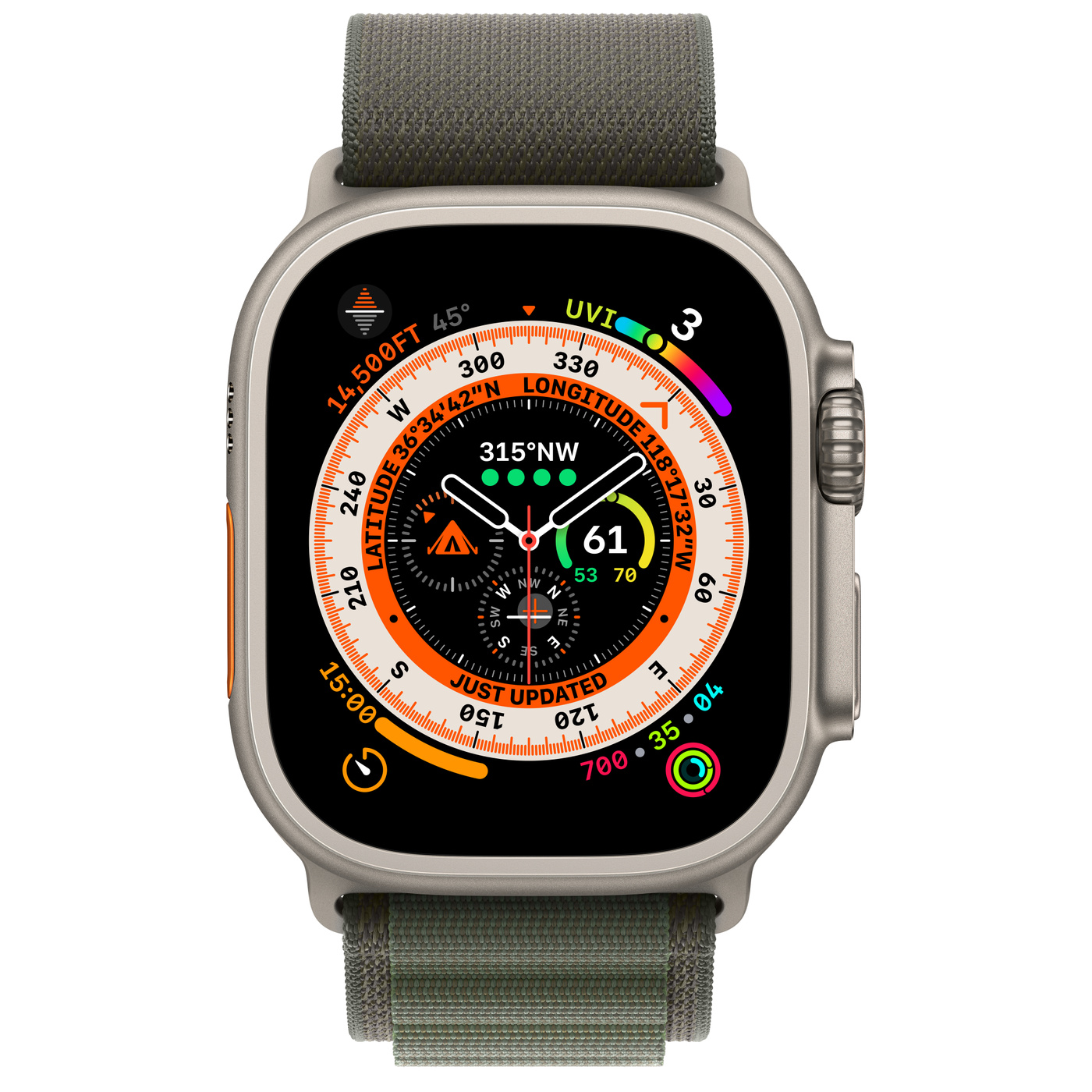
The Apple Watch Ultra 49mm Titanium Green is built for rugged use, and understanding its core functions can turn a casual stroll into a well‑tracked expedition. Below we walk through the essential steps to get the most out of this premium smartwatch.
Key takeaways
- Pair the watch with your iPhone in under five minutes.
- Use the custom Action button for quick Compass waypoints.
- Activate the Depth Gauge automatically when you dive.
- Battery can stretch beyond 36 hours with low‑power mode.
- Safety features like Siren and Emergency SOS work offline.
Apple Watch Ultra 49mm Titanium Green: Key Features Overview
This model combines a 49 mm titanium case with a brighter, always‑on Retina display, dual‑frequency GPS, and a dedicated Action button. The titanium finish resists scratches and corrosion, making it ideal for the varied climates of Uganda—from the humid shores of Lake Victoria to the high‑altitude trails of the Rwenzori.
Getting started: pairing and initial setup
First, ensure your iPhone runs iOS 17 or later. Open the Apple Watch app, tap Start Pairing, and hold the watch face up to the camera. The watch will appear on your phone screen; tap Set Up Apple Watch and follow the prompts.
During setup you can choose a watch face that highlights the larger display, enable cellular if you have a compatible carrier, and install the default adventure apps that come pre‑loaded.
Navigation basics: Digital Crown and Action button
The Digital Crown works as it always has: rotate to scroll, press to return to the watch face, and hold for Siri. The new customizable Action button sits on the right side of the case. By default it launches the Compass app, but you can reassign it to start a workout, turn on the flashlight, or mark a waypoint.
To change the Action button function, open the Settings app on the watch, tap Action Button, and select your preferred shortcut. For hikers in Uganda’s Rwenzori Mountains, setting it to start a backtrack is often the most useful.
Exploration tools: GPS, Compass, and Backtrack
The Ultra’s dual‑frequency GPS delivers precise location data even in dense forest or canyon environments. Open the Compass app, tap the Action button, and choose Mark Waypoint. The watch stores the point, and you can later backtrack by selecting Backtrack from the same menu.
All routes, distances, and elevation changes appear on the redesigned Compass screen, making it easy to stay oriented without pulling out a phone.
Adventure tools: Depth gauge, water temperature, and Siren
When you submerge the watch up to 40 meters, the Depth Gauge and water‑temperature sensor activate automatically. This is handy for scuba trips at Lake Victoria or the Indian Ocean coast.
The built‑in Siren emits a 120‑decibel tone that can alert rescuers if you’re lost or in distress. Press and hold the Action button for three seconds to trigger it.
Health and safety: heart rate, fall detection, Emergency SOS
Standard health sensors monitor heart rate, blood oxygen, and temperature changes. If the watch detects a hard fall, it will tap your wrist and ask if you’re okay. Unresponsive for a minute? It will automatically call emergency services—useful in remote areas where mobile coverage is spotty.
Emergency SOS works even without a cellular connection by sending your location to local emergency numbers via any available network.
Battery management for long outings
Under normal use the Ultra offers up to 36 hours of runtime. Activating low‑power mode extends this to roughly 60 hours, but disables the always‑on display and some background updates.
To conserve power on multi‑day hikes, consider turning off the raise‑to‑wake feature, limiting background app refresh, and using a simple watch face with fewer complications.
Practical tips for extending battery life
- Switch to a minimalist watch face that shows only time and essential complications.
- Disable the always‑on display when you know you’ll be in bright daylight.
- Turn off unnecessary notifications, especially from social apps.
- Use the built‑in Power Reserve mode for emergency navigation only.
| Feature | Apple Watch Ultra 49mm Titanium Green | Standard Apple Watch Series 9 |
|---|---|---|
| Battery life (normal) | 36 hours | 18 hours |
| Water resistance | 100 m (recreational diving) | 50 m |
| Case material | Aerospace‑grade titanium | Aluminum / stainless steel |
Putting it all together: a day in the field
Start your morning by checking the weather complication on the watch face. Use the Action button to launch a quick Compass waypoint as you leave your campsite. Throughout the hike, glance at the altitude and distance metrics without pulling out your phone.
If you decide to take a dip in a lake, the Depth Gauge will appear automatically, and you can monitor water temperature in real time. Should an unexpected situation arise, the Siren and Emergency SOS are just a press away, even if you’re out of cellular range.
At the end of the day, enable low‑power mode, charge the watch for a short period, and you’ll be ready for the next adventure.
Now you have the basics to pair, navigate, and stay safe with the Apple Watch Ultra 49mm Titanium Green. Explore Uganda’s trails, lakes, and cities with confidence, knowing the watch’s sensors and safety tools are at your fingertips.
APPLE WATCH ULTRA 49MM TITANIUM GREEN
UGX3,500,000
FAQ
How do I pair the Apple Watch Ultra 49mm Titanium Green with my iPhone?
Open the Apple Watch app on an iPhone with iOS 17+, tap Start Pairing, point the camera at the watch face, and follow the on‑screen instructions.
Can I use the Action button for a specific workout?
Yes, go to Settings → Action Button on the watch and select any workout shortcut you prefer.
Is the Depth Gauge accurate for scuba diving?
The gauge activates automatically up to 40 meters and is calibrated for recreational diving, matching industry standards.
How long does the battery last in low‑power mode?
Low‑power mode can stretch battery life to around 60 hours, though the always‑on display and some sensors are disabled.
Will Emergency SOS work without cellular service?
SOS can still send your location via any available network, including satellite‑linked services where supported.