Magic Mouse Review: Apple’s Touch‑Enabled Mouse Still Shines
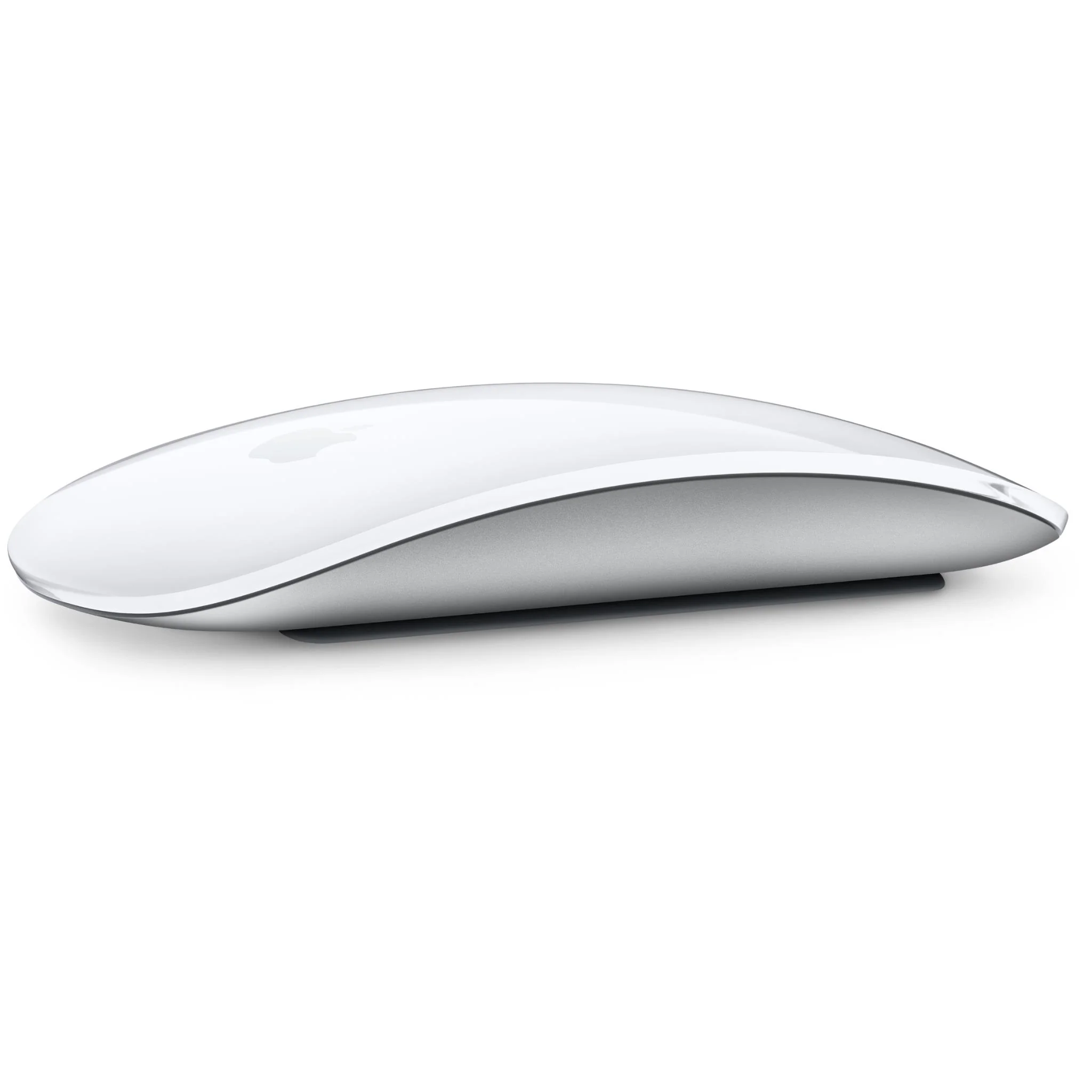
Looking for a reliable, gesture‑focused mouse for your Mac? This magic mouse review explores whether Apple’s second‑generation Magic Mouse lives up to the hype in Uganda’s growing Mac community. From the feel of the smooth shell to the quirks of a bottom‑mounted charger, we break down what matters most to buyers.
Key takeaways
- Multi‑Touch surface makes scrolling and swiping seamless.
- Rechargeable battery lasts about ten days with typical use.
- Charging requires the mouse to stay flat, limiting use while plugged in.
- Pairs instantly with any Mac running macOS 10.11 or later.
- Available in black and silver for UGX450,000 at Apple Store Uganda.
Magic Mouse Review: Design and Build Quality
The Magic Mouse 2 retains the low‑profile silhouette introduced in 2015, but Apple trimmed a few grams, making it feel lighter on the desk. Its continuous bottom shell eliminates moving parts, which reduces wear and gives the mouse a solid, seamless glide. The optimized foot design—small silicone pads hidden beneath the shell—means less resistance, especially on smooth office surfaces common in Kampala offices.
Gestures that Replace Buttons
Where the Magic Mouse truly shines is its Multi‑Touch surface. A simple swipe left or right switches between full‑screen apps, while two‑finger scrolling mimics a trackpad’s fluid motion. According to a Hindustan Times article, “the Magic Mouse’s lasting appeal lies in how naturally it turns a finger swipe into a Mac gesture, something rivals have found impossible to make.” This makes the mouse a natural extension of macOS, especially for users who rely on Mission Control, Launchpad and web navigation shortcuts.
Battery Life and Charging Realities
The Magic Mouse 2 is completely rechargeable, eliminating the need for disposable batteries. Users who work 5‑6 hours a day typically charge the mouse once every ten days, which aligns with the experience described in a recent note on charging habits. The downside, highlighted by Analytics Insight, is that the charging port sits on the bottom. As a result, “you can’t use it while charging,” forcing a short downtime when the battery runs low.
| Aspect | Magic Mouse 2 | Typical Wired Mouse |
|---|---|---|
| Battery life (average use) | ~10 days per charge | Continuous (plugged in) |
| Charging method | Lightning cable (bottom port) | Power via USB |
| Usable while charging | No | Yes |
“A common complaint is that ‘you can’t use it while charging.'” – Analytics Insight
Compatibility and Setup
Out of the box, the Magic Mouse 2 pairs automatically with any Mac running macOS 10.11 or later. The Bluetooth connection is swift, and the mouse appears in System Preferences where users can customise primary click, secondary click and scroll direction. It works equally well with MacBook Air, MacBook Pro and iMac models that are popular in Ugandan businesses and universities.
Pros and Cons for Ugandan Buyers
- Pros: Sleek design, gesture‑rich interface, rechargeable battery, quiet operation.
- Cons: Charging requires the mouse to be flat, no option for wired use, higher price point than many local alternatives.
Who Should Consider the Magic Mouse 2?
If you spend most of your day on a Mac and value fluid gestures over traditional button clicks, the Magic Mouse 2 is a solid match. Creative professionals, students and office workers who appreciate a clutter‑free desk will benefit from its wireless design. However, if you need a mouse that can stay functional while charging or prefer tactile clicks for gaming, a conventional mouse may serve you better.
Overall, this magic mouse review finds that the device delivers on Apple’s promise of a minimalist, gesture‑centric tool, provided you can work around its charging limitation. The model is in stock at Apple Store Uganda for UGX450,000 and comes in both black and silver.
Magic Mouse 2
UGX450,000
FAQ
How long does the Magic Mouse 2’s battery last?
Typical use of 5‑6 hours per day lets the mouse run for about ten days before needing a charge.
Can I use the Magic Mouse 2 while it’s charging?
No, the Lightning port is on the bottom, so the mouse must stay flat while plugged in.
Does the Magic Mouse 2 work with older Macs?
It works with any Mac running macOS 10.11 or later, which includes most Macs from the past decade.
Is the Magic Mouse 2 louder than a traditional mouse?
The mouse is virtually silent because it has no mechanical click mechanism.
What colors are available in Uganda?
The Magic Mouse 2 is offered in black and silver at Apple Store Uganda.
Sources
- Hindustan Times: At 17, Apple’s Magic Mouse still proves that gestures win over buttons | Business News
- Analytics Insight: 4 Ultra-Portable Mice And Keyboards You Can Use With Your Tablet
- note: How often do you need to charge the Magic Mouse 2? | Why using it 5-6 hours a day and charging once every 10 days is not a problem, even if you can't use it while charging