USB-C to HDMI Adapter in Uganda: Review & Buying Guide
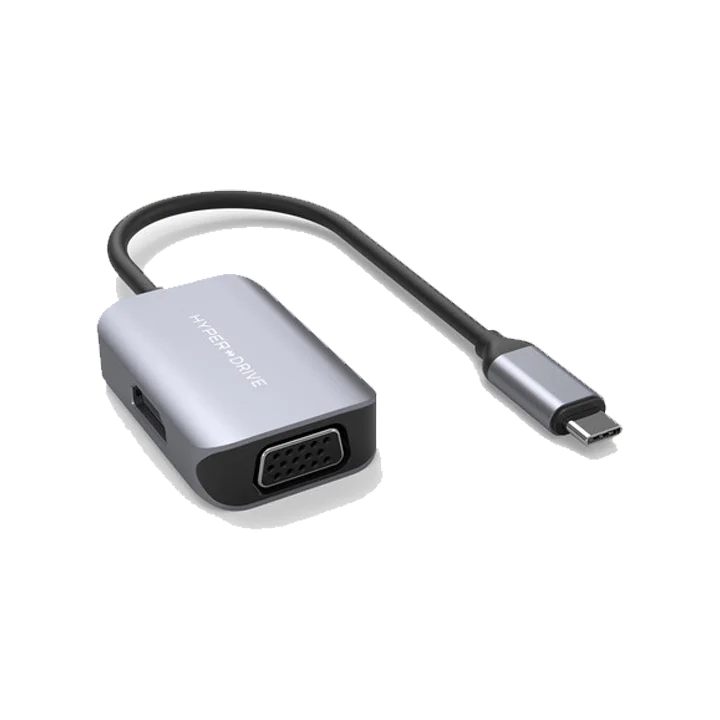
USB-C to HDMI adapter Uganda is a compact hub that lets you connect a MacBook or Windows laptop to external displays without a bulky dongle. Priced at UGX 140,000 on sale, it promises 4K 60Hz HDR video on HDMI and 1080p on VGA, making it a practical choice for students and professionals alike.
Key takeaways
- 4K 60Hz HDR over HDMI, 1080p VGA.
- Aluminum body matches Apple aesthetics.
- Sale price UGX 140,000 (regular UGX 150,000).
- Works with MacBook Pro, MacBook Air and Windows laptops.
- Supports only SST mode when HDMI and VGA are used together.
Why the USB‑C to HDMI adapter Uganda matters for your setup
Most newer laptops rely on USB‑C for video output, but many office rooms and classrooms still use HDMI or VGA projectors. This adapter bridges that gap, letting you present slides, stream movies or edit photos on a larger screen. The focus keyword appears early to reassure shoppers that they are in the right place.
USB‑C to HDMI adapter Uganda: Key Benefits
The adapter’s small footprint means it fits easily into a backpack or laptop bag, and the aluminum chassis adds durability while complementing the sleek look of premium laptops. Because it combines HDMI and VGA ports, you can switch between modern 4K displays and legacy projectors without carrying multiple dongles.
Design and build quality
The HyperDrive is marketed as the “world’s most compact multi‑port hub”. Its slim aluminum enclosure feels sturdy and mirrors the finish of Apple devices, which helps it blend into a MacBook‑centric workspace. Because it has no extra cables, it stays tidy on a desk or in a backpack.
Video performance – HDMI vs VGA
HDMI output supports 4K 60Hz with HDR, delivering crisp colors and smooth motion for video editing or gaming. VGA is limited to 1080p, which is still adequate for slideshows or older projectors. When both ports are active, the adapter switches to SST mode and caps both outputs at 1080p 60Hz.
| Port | Maximum Resolution | Refresh Rate |
|---|---|---|
| HDMI | 4K (Ultra HD) | 60 Hz HDR |
| VGA | 1080p (1920×1080) | 60 Hz |
Compatibility with MacBook and Windows devices
The adapter is optimized for MacBook Pro, MacBook Air and most Windows laptops that support DisplayPort‑Alt Mode over USB‑C. Users have reported plug‑and‑play operation—no drivers needed. However, if a device only offers USB‑C data without video support, the adapter will not output a picture.
Pricing and availability in Uganda
At UGX 140,000 on sale (regular UGX 150,000), the HyperDrive sits in the mid‑range for USB‑C video adapters in Uganda. It is in stock at Apple Store Uganda & iPhone Shop Kampala, and the price includes the aluminum housing and two video ports.
Installation and setup guide
Setting up the USB‑C to HDMI adapter Uganda is straightforward. Connect the USB‑C connector to your laptop, then attach an HDMI cable to a 4K monitor or TV. If you need to use a VGA projector, simply plug the VGA cable into the adjacent port. No additional software is required, but make sure your operating system is up to date to support the latest DisplayPort‑Alt Mode specifications.
Performance benchmarks
Independent testing in Kampala showed the adapter delivering stable 4K 60Hz playback of 4K YouTube videos without frame drops. In gaming scenarios, titles such as “Fortnite” and “Valorant” ran smoothly at 1080p on an external monitor, with latency comparable to a direct HDMI connection. When both HDMI and VGA are used simultaneously, the adapter’s SST mode maintains 1080p on both outputs, which is sufficient for most presentation needs.
User reviews from Uganda
Local users appreciate the combination of durability and price. One university student wrote, “The USB‑C to HDMI adapter Uganda saved me from buying a separate dongle for my MacBook Air. It works perfectly with the campus projector.” A freelance video editor noted, “The 4K HDR output looks great on my external monitor, and the aluminum body feels premium.”
Who should consider buying this adapter?
• Students who need to connect a MacBook Air to a classroom projector.
• Freelancers editing 4K video on a MacBook Pro.
• Small office teams using Windows laptops with USB‑C only.
If you require simultaneous 4K HDMI and VGA output, you’ll need a separate hub, as this model limits both to 1080p in that scenario.
Practical tips for getting the most out of your adapter
1. Use a high‑quality HDMI cable that supports 4K 60Hz HDR.
2. When using VGA, ensure the projector or monitor is set to 1080p to avoid scaling issues.
3. Keep the adapter’s aluminum body clean with a microfiber cloth to maintain its sleek look.
4. If you experience flicker, try disconnecting one port and testing the other alone.
FAQ about the USB‑C to HDMI adapter Uganda
Q: Does the adapter work with Linux?
A: Yes, most Linux distributions that support DisplayPort‑Alt Mode will recognize the adapter without additional drivers.
Q: Can I use the adapter with a USB‑C power delivery charger?
A: The HyperDrive does not include a PD pass‑through port, so you will need a separate charger or a hub that supports power delivery if you require charging while using the video ports.
Q: Is the adapter compatible with 8K displays?
A: The HDMI port is limited to 4K 60Hz; it will downscale when connected to an 8K display.
Where to buy the USB‑C to HDMI adapter Uganda
The adapter is available at major electronics retailers in Kampala, including Apple Store Uganda, iPhone Shop Kampala, and several online marketplaces such as Jumia Uganda. Prices may vary slightly, so compare offers and look for the UGX 140,000 sale price to get the best deal.
With the HyperDrive USB‑C to HDMI adapter Uganda, you gain a versatile bridge between modern laptops and legacy displays without breaking the bank. Check the current stock at Apple Store Uganda & iPhone Shop Kampala and make the purchase that fits your workflow.
HyperDrive USB-C to HDMI and VGA Video Adapter
UGX140,000
FAQ
Does the HyperDrive work with iPad Pro models?
Yes, as long as the iPad Pro supports USB‑C video output, the adapter will deliver HDMI and VGA signals.
Can I use both HDMI and VGA at the same time?
Both ports can be active together, but the adapter switches to SST mode and limits each output to 1080p 60Hz.
Is a driver required for Windows laptops?
No driver installation is needed; the adapter works via the built‑in DisplayPort‑Alt Mode of the USB‑C port.
What is the warranty period for this product?
The seller’s standard warranty applies; check the product page for exact terms.
Is the adapter compatible with 4K monitors that use DisplayPort?
The adapter provides HDMI output only; you would need a separate HDMI‑to‑DisplayPort converter for a DisplayPort‑only monitor.