Apple 45W MagSafe Power Adapter – How to Use It on Your MacBook Air
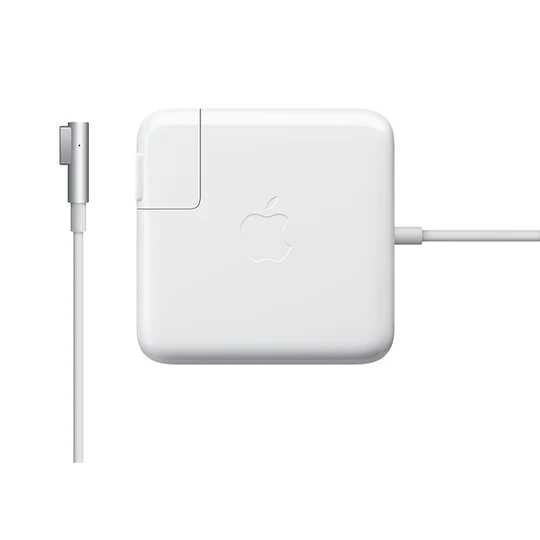
The Apple 45W MagSafe Power Adapter is designed for the MacBook Air and uses a magnetic DC connector that snaps into place. In the first two minutes you’ll see an amber LED when charging and a green light when the battery is full.
Key takeaways
- Magnetic connection protects the cable from accidental pulls.
- Amber LED means charging, green LED means full.
- Adapter works while the laptop is on, asleep or off.
- Compact design folds the cable for easy travel.
- Priced at UGX150,000 on sale at Apple Store Uganda.
Apple 45W MagSafe Power Adapter – specs and what’s in the box
Part number MC747B/B, the adapter delivers 45 watts of power through a magnetic DC connector that is exclusive to MacBook Air models with a MagSafe port. The package includes the AC wall brick, a detachable AC lead, and the magnetic connector head. The LED indicator sits on the head of the connector, turning amber while the battery charges and green when it reaches 100 %.
How the Apple 45W MagSafe Power Adapter works
Using the adapter is straightforward:
- Plug the AC lead into the wall outlet and attach the brick to the lead.
- Align the magnetic tip with the MagSafe port on your MacBook Air; the magnets pull it into place.
- The LED will light amber, confirming that power is flowing.
- When the battery is full, the light switches to green.
The magnetic DC connector also acts as a safety release – if the cord is tugged, the connector detaches without pulling the laptop off a desk or table.
When to use the 45W adapter – everyday and travel scenarios
Because the adapter is compact and the cable can be wound neatly around the brick, it fits easily in a backpack or briefcase. It is ideal for:
- Daily office use where the laptop stays on a desk.
- Traveling within Uganda or abroad – the small footprint saves space.
- Operating the MacBook Air without a battery; the adapter can power the system directly.
Even when the laptop is in sleep mode, the adapter continues to top up the battery, keeping it ready for the next session.
Apple 45W vs. other MagSafe adapters – quick comparison
| Feature | Apple 45W MagSafe | Apple 60W MagSafe (older) |
|---|---|---|
| Power output | 45 W | 60 W |
| Size | Compact, cable folds | Larger brick |
| LED indicator | Amber/Green | Amber/Green |
| Best for | MacBook Air | MacBook Pro 13‑inch |
The 45W model is tuned for the Air’s battery capacity, delivering fast yet safe charging without excess heat. The 60W version can charge larger Macs but is bulkier and costs more.
Tips for optimal use and safety
To keep the magnetic DC connector in good shape, avoid bending the cable sharply and store it with the coil wrapped around the brick as shown in the manual. If you notice the LED staying amber for an extended period, check that the wall outlet supplies a stable voltage. In Uganda’s occasional power fluctuations, using a surge protector can prevent damage.
Buying the Apple 45W MagSafe Power Adapter in Uganda
The adapter is in stock at Apple Store Uganda & iPhone Shop Kampala for UGX150,000, down from UGX160,000. Buying locally ensures you receive a genuine Apple product with a warranty that can be serviced in Kampala. Compare the price with other retailers, but remember that counterfeit adapters lack the magnetic safety feature and can harm your MacBook Air.
Once you have the adapter, simply follow the steps above and you’ll have a reliable charging solution that protects both your cable and your laptop.
Next steps: plug the adapter in, let the LED turn green, and enjoy uninterrupted work or study sessions. If you travel frequently, keep a spare adapter in a separate bag – the compact design means it won’t add noticeable weight.
Compatibility with other Mac models
While the apple 45w magsafe power adapter is marketed for the MacBook Air, it can also charge older MacBook models that feature the same MagSafe 1 connector. However, charging speed may be slower on devices that expect higher wattage. Always verify the connector type before using the adapter with a different Mac.
Maintenance and troubleshooting
If the adapter does not charge, try these steps:
- Inspect the magnetic tip for dust or debris and clean gently with a dry cloth.
- Test the wall outlet with another device to ensure it supplies power.
- Swap the detachable AC lead with a known‑good one to rule out cable failure.
- Reset the SMC on your MacBook Air; this often resolves charging‑related issues.
Persistent problems may indicate a faulty adapter, in which case you should contact Apple Support or visit an authorized service provider.
Environmental considerations
When the apple 45w magsafe power adapter reaches the end of its usable life, recycle it responsibly. Apple’s recycling program in Uganda accepts electronic waste, helping reduce landfill impact. Keeping the adapter in a protective sleeve also extends its lifespan and reduces the need for premature replacement.
Apple 45W MagSafe Power Adapter for MacBook Air
UGX150,000
FAQ
Is the Apple 45W MagSafe Power Adapter compatible with all MacBook Air models?
It works with MacBook Air models that have a MagSafe power port. Check your Mac’s specifications in the > About This Mac menu to confirm.
What does the LED color indicate?
Amber means the battery is charging; green means the battery is fully charged.
Can I use the adapter to run the MacBook Air without a battery?
Yes, the adapter can power the laptop directly even if the battery is removed or dead.
Do I need a surge protector in Uganda?
Using a surge protector is advisable because of occasional voltage spikes that could affect the adapter.
How much does the adapter cost in Uganda?
The Apple 45W MagSafe Power Adapter is UGX150,000 on sale at Apple Store Uganda, regular price UGX160,000.