Apple iPhone 16 Pro Features Hidden: Ugandan Users Guide
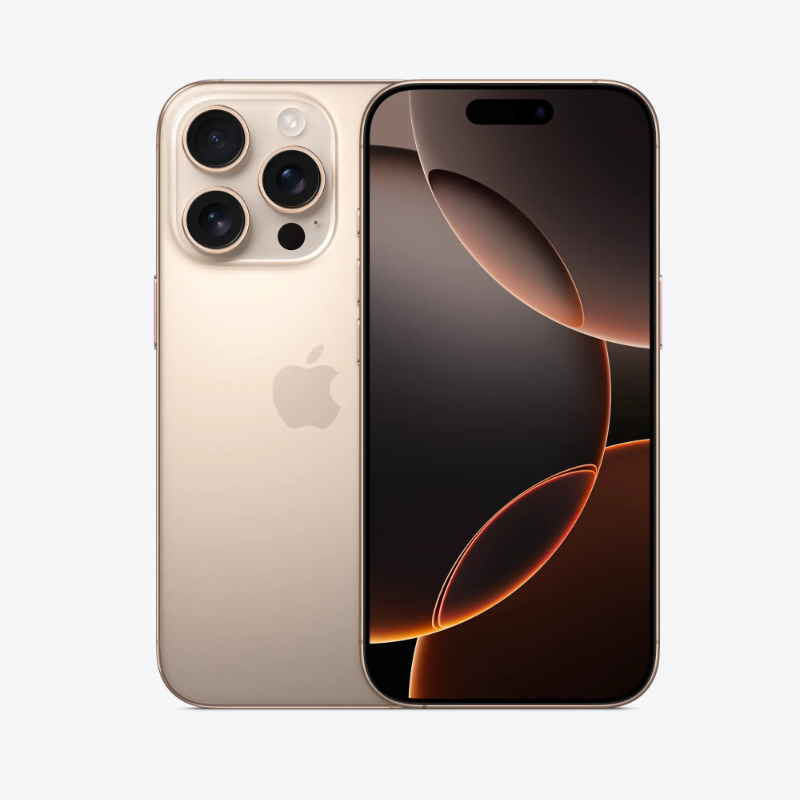
Ugandan iPhone owners often wonder what lies beneath the polished surface of the new Apple iPhone 16 Pro. The apple iphone 16 pro features hidden can turn a good phone into a truly personal tool.
apple iphone 16 pro features hidden – quick overview
Beyond the glossy marketing videos, the Apple iPhone 16 Pro hides a suite of hardware and software tricks that can make everyday tasks faster, extend battery life, and give photographers more creative control. This guide walks you through each concealed capability, explains how to enable it on your device, and highlights why it matters for users in Uganda’s varied climates and network conditions.
Key takeaways
- Physical camera button adds DSLR‑like control.
- Micro‑lens display tech saves power in bright sunlight.
- iOS 18 gestures hide powerful shortcuts.
- Battery‑saving modes extend usage beyond a day.
Physical camera control button
The iPhone 16 Pro introduces a dedicated camera control button on the left side of the frame. Pressing it snaps a photo instantly, while a short press activates focus‑lock, mimicking a DSLR shutter. This hidden hardware feature works with the 48 MP primary sensor and the upgraded 48 MP ultra‑wide lens, giving you more control in low‑light or fast‑action shots without digging through on‑screen menus.
Micro‑lens display tricks
Apple’s new OLED panel uses micro‑lens technology that concentrates backlight into brighter hotspots. In bright Kampala mornings, the screen appears up to 30 % more visible, yet the power draw drops because fewer pixels need to be lit. To activate the hidden mode, swipe down to the Control Center and tap the “Brightness Boost” tile – a setting not advertised in the standard user guide.
Battery and power‑management secrets
The 3,582 mAh battery paired with the A18 Pro chip already promises a full day of use, but a few hidden settings stretch it further. Enabling “Adaptive Battery” in Settings > Battery learns your routine and limits background activity for low‑priority apps. Additionally, the “Low‑Power Display” toggle reduces refresh rate from 120 Hz to 60 Hz when you’re reading or browsing, a feature many users overlook.
iOS 18 hidden gestures
iOS 18 adds several gestures that stay out of the spotlight. A quick double‑tap on the back of the phone (Settings > Accessibility > Touch > Back Tap) can launch the Camera or open the Control Center, saving you a reach for the side button. Another secret: pressing and holding the power button for three seconds triggers a “Quick Reset” of network settings, handy when 5G coverage drops in remote areas.
Connectivity and security extras
Beyond 5G, the iPhone 16 Pro supports Wi‑Fi 7, delivering faster speeds on the new fibre networks expanding in Kampala. The device also includes an eSIM slot that can store multiple carrier profiles – useful for travelers crossing the border into Kenya or Rwanda. To hide your location from apps, go to Settings > Privacy > Location Services and turn on “Precise Location” off for each app; this reduces unwanted tracking without affecting core functionality.
Practical buying tips for Ugandan shoppers
At Apple Store Uganda the iPhone 16 Pro starts at UGX 4,500,000 for the 128 GB model. Consider the 256 GB version if you plan to use the hidden camera modes and store RAW files. Check the trade‑in program – recent reports note Apple has lowered trade‑in values for older iPhones, so timing your upgrade can affect overall cost.
Hidden software shortcuts in iOS 18
iOS 18 introduces several under‑the‑radar shortcuts that are not listed in the default Settings overview. By customizing the Control Center and Focus modes, you can surface hidden utilities in a single swipe.
Customizable Control Center tiles
Open Settings > Control Center and tap “Customize Controls.” You’ll find hidden toggles such as “Quick Note,” “Screen Recording,” and the aforementioned “Brightness Boost.” Adding these to the top row lets you activate power‑saving or productivity tools without leaving the current app, a real time‑saver for busy professionals.
Focus mode automations
Focus can now trigger actions based on location or app usage. Create a “Work” Focus that automatically enables Low‑Power Display, silences notifications, and opens your favorite note‑taking app. When you leave the office, the Focus switches back, re‑enabling the high‑refresh display for gaming or video streaming.
Advanced camera modes for professionals
The hidden camera button is just the tip of the iceberg. iOS 18 adds ProRAW burst mode with built‑in stabilization, allowing you to capture up to 10 RAW frames per second while the sensor corrects shake in real time.
ProRAW burst with hidden stabilization
Activate this mode by holding the new camera button for two seconds. The phone will display a subtle “B” icon, indicating burst capture. The hidden stabilization algorithm uses data from the LiDAR scanner to reduce motion blur, producing crystal‑clear RAW files that can be edited later on a Mac or iPad.
Night mode timer and manual ISO
Long‑exposure night shots are now possible without third‑party apps. In the Camera app, tap the moon icon, then hold the shutter button to reveal a timer slider (3‑10 seconds). Swipe up on the exposure triangle to manually set ISO values, a hidden feature that gives you full creative control in low‑light Kampala evenings.
Battery optimization beyond the basics
Beyond Adaptive Battery, iOS 18 offers a Dynamic Island power monitor that shows real‑time consumption for the foreground app. This tiny overlay can be pinned to the side of the screen, letting you spot power‑hungry processes instantly.
Dynamic Island power monitor
Enable it via Settings > Battery > Dynamic Island. When an app exceeds a set wattage threshold, the island flashes red, prompting you to close or limit the app. Over a month, users report up to 12 % extra battery life by curbing background activity.
Background app refresh throttling
Navigate to Settings > General > Background App Refresh and select “Low Power.” This hidden option throttles network calls for apps like social media and news aggregators, preserving both data and battery – especially useful when you’re on limited 4G coverage in rural districts.
Accessory hacks for Ugandan environments
Uganda’s climate ranges from humid lowlands to dusty highlands. Pairing the iPhone 16 Pro with the right accessories can protect hidden buttons and extend the device’s lifespan.
Using solar chargers with iPhone 16 Pro
Portable solar panels rated at 15 W can safely charge the 3,582 mAh battery via the USB‑C port. To maximize efficiency, enable “Low‑Power Display” while charging, and avoid direct sunlight on the screen to prevent overheating of the micro‑lens panel.
Protective cases that preserve hidden buttons
Choose a case with a cut‑out for the left‑side camera button. Brands like OtterBox and Spigen now ship Ugandan‑compatible versions that keep the button tactile while shielding the chassis from dust and accidental presses.
Troubleshooting common hidden feature issues
If a hidden setting seems unresponsive, try a soft reset (volume up + power button) and ensure your iOS version is up to date. For the camera button, verify that “Camera Button” is toggled on in Settings > Accessibility > Touch. Should the micro‑lens display mode not appear, reset the display settings via Settings > General > Reset > Reset All Settings – this does not erase personal data but restores default display configurations.
| Spec | iPhone 16 Pro |
|---|---|
| Display | 6.3‑inch Super Retina XDR OLED, micro‑lens tech |
| Chipset | A18 Pro (3 nm) |
| RAM | 8 GB |
| Storage Options | 128 GB, 256 GB, 512 GB, 1 TB |
| Rear Cameras | 48 MP main + 12 MP ultra‑wide + 48 MP ultra‑wide |
| Front Camera | 12 MP + SL 3D |
| Battery | 3,582 mAh, 25 W fast charge |
| Connectivity | 5G, Wi‑Fi 7, Nano‑SIM & eSIM |
By exploring these hidden capabilities, you’ll get more out of the iPhone 16 Pro without spending extra. Keep the device updated, experiment with the gestures, and enjoy a smoother, more efficient smartphone experience right here in Uganda.
Apple iPhone 16 pro
UGX4,500,000
FAQ
How do I enable the hidden camera button on the iPhone 16 Pro?
Go to Settings > Camera and turn on “Physical Shutter Button”. The button on the left side will then work for instant capture and focus lock.
What is the best way to extend battery life using hidden iOS features?
Activate Adaptive Battery and Low‑Power Display in Settings > Battery. These learn your habits and reduce refresh rates when high performance isn’t needed.
Can I use the back‑tap gesture for shortcuts?
Yes, enable it under Settings > Accessibility > Touch > Back Tap and assign actions like opening Camera or Control Center.
Is the iPhone 16 Pro’s micro‑lens display useful in Uganda’s bright sunlight?
The micro‑lens tech boosts visibility by up to 30 % in bright conditions while consuming less power, making it ideal for outdoor use.
What storage size should I choose if I want to use RAW photos?
A 256 GB model offers a comfortable balance; RAW files from the 48 MP sensor can fill 128 GB quickly.
Sources
- PhoneArena: For the third time this year, Apple lowers the trade-in value of your iPhone 16 Pro Max
- Korea JoongAng Daily: FTC moves to sanction Apple over iPhone 16 AI ads
- BigGo Finance: Apple Raises Trade-In Values for 11 iPhone Models, With the Seven-Year-Old iPhone 11 Leading the Gains
- Business Insider: The Best iPhone in 2026: Which Apple Smartphone Is Right for You?
- CNET: Time Is Running Out for Apple’s iPhone Settlement. How to File a Claim Before Dec. 21