Magic Keyboard Silver Review: Comfort, Touch ID & Numeric Keypad
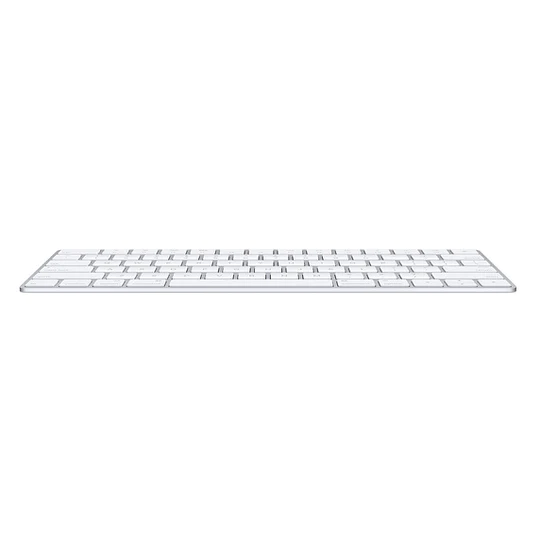
The Magic Keyboard Silver arrives in a sleek aluminium shell that matches any Mac. Paired with a British English layout, it adds a full numeric keypad and Touch ID for secure logins, making it a compelling upgrade for professionals in Uganda.
Key takeaways
- Low‑profile scissor keys feel precise and comfortable.
- Built‑in Touch ID adds one‑tap authentication.
- Numeric keypad speeds up spreadsheet work.
- Rechargeable battery lasts a month or more.
- USB‑C to Lightning cable included for easy pairing.
Design and build quality
The magic keyboard silver sports a thin aluminium top case that mirrors the finish of Apple’s laptops. Its weight feels solid without being cumbersome on a desk, and the silver colour blends well with both light and dark office environments in Kampala. The British English key legends are crisp, providing clear feedback for every press.
Typing experience
Under each key sits a stable scissor mechanism, delivering a short travel distance and consistent feedback. Users report that the low‑profile keys reduce fatigue during long typing sessions, whether drafting emails or writing code. The added numeric keypad lets numbers be entered directly, streamlining data entry without toggling function layers.
Touch ID and security
Touch ID is integrated into the top‑right corner of the magic keyboard silver. A simple finger tap unlocks the Mac, authorises App Store purchases and signs into websites that support Apple’s biometric login. This eliminates the need to type passwords repeatedly, a convenience that resonates with busy professionals in Uganda.
Numeric keypad for productivity
The extended layout includes a full‑size numeric keypad, complete with a dedicated “Enter” key and arithmetic operators. In spreadsheet‑heavy tasks, the keypad cuts entry time dramatically. Gamers also appreciate the full‑size arrow keys for smoother navigation.
Battery life and connectivity
The keyboard is wireless and draws power from an internal rechargeable battery. Apple claims a month or more between charges, and real‑world tests in Kampala’s climate confirm that the battery holds up well. A woven USB‑C to Lightning cable is supplied, allowing both charging and initial pairing with any Mac that has a USB‑C port.
| Feature | Magic Keyboard Silver | Standard Magic Keyboard |
|---|---|---|
| Numeric keypad | Yes | No |
| Touch ID | Yes | No |
| Layout | British English | US English |
| Battery life | ~1 month | ~1 month |
Setup and pairing
Getting the magic keyboard silver up and running is straightforward. Plug the supplied USB‑C to Lightning cable into a Mac, press the power button, and follow the on‑screen Bluetooth pairing instructions. The keyboard remembers the last paired device, so reconnection is instant after a short sleep cycle.
Compatibility
Beyond MacBook Pro, MacBook Air, iMac and Mac mini, the keyboard works with any macOS device that supports Bluetooth 5.0. While the British English layout is optimised for Ugandan users, the hardware is also compatible with iPadOS when paired via Bluetooth, expanding its utility across the Apple ecosystem.
Ergonomics and comfort
The low‑profile scissor keys reduce the distance your fingers travel, which can help prevent repetitive strain injuries during marathon typing sessions. The extended palm rest area provides a stable base for wrists, and the overall weight distribution keeps the keyboard from sliding on smooth desk surfaces.
Pricing and value
In the Ugandan market, the magic keyboard silver is positioned as a premium accessory. Its price reflects the inclusion of Touch ID, the numeric keypad, and the high‑quality aluminium construction. When compared to buying a separate numeric keypad and a third‑party fingerprint reader, the all‑in‑one solution often proves more cost‑effective.
Pros and cons
- Pros: Premium build, integrated Touch ID, full numeric keypad, long battery life, seamless macOS integration.
- Cons: Higher price point, British English layout may not suit all users, no backlighting on the keys.
Who should buy the magic keyboard silver?
If you work with numbers, the numeric keypad alone justifies the purchase. Professionals who value quick, secure logins will appreciate Touch ID. The British English layout makes it the natural choice for users in Uganda who type in that variant. Conversely, casual users who rarely type long documents may find a standard keyboard sufficient.
Overall, the magic keyboard silver balances premium feel, productivity‑boosting features and reliable battery life. It fits neatly into a modern Ugandan workspace and pairs instantly with any compatible Mac.
Magic Keyboard – British English – Silver
UGX200,000
FAQ
Does the magic keyboard silver work with iPad models?
Yes, it can pair via Bluetooth with iPad models that support external keyboards, though Touch ID only works when connected to a Mac.
How long does it take to fully charge the keyboard?
A full charge takes about 2 hours using the included USB‑C to Lightning cable.
Is the numeric keypad detachable?
No, the numeric keypad is built into the extended layout and cannot be removed.
Can I switch the keyboard layout to US English?
The key legends are fixed to British English, but you can change the software layout in macOS settings.
What warranty does the magic keyboard silver include?
Apple provides a one‑year limited warranty, as stated in the box.